
How do hardware manufacturing teams prevent old drawing revisions from entering production?
Teams eliminate obsolete drawing errors by centralizing CAD files in a single cloud PLM/ERP system-of-record, generating dynamic revision watermarks, automating G-code purging on CNC laser and press brake servers, enforcing three-way dock audits (PO revision = CoC revision = Physical Part Marking), and conducting unannounced shop floor audits to confiscate rogue paper prints.
One of the most expensive and preventable failures in precision sheet metal manufacturing is fabricating components to an obsolete engineering drawing revision. When a critical hole cutout moves 4 mm in REV C to accommodate an updated PCB connector, but the machine operator pulls an unpurged REV B paper print left on the press brake bench, entire production batches of custom enclosures are ruined. Preventing revision contamination requires a closed-loop system encompassing digital document distribution, factory floor governance, and physical dock gating.

Why Obsolete Revisions Slip Through: Root Cause Analysis
Hardware audits consistently reveal three vulnerabilities where outdated revisions bypass conventional controls:
- Email Attachment Traps: Buyers or engineers email revised 2D PDF blueprints and STEP files directly to supplier sales contacts. The sales team fails to forward the update to CAM programmers, who continue cutting files pulled from initial quotation archives.
- Local Machine Server Memory: CNC laser cutters and automated punch presses cache nesting programs locally on the machine hard drive. Operators select familiar program filenames from local memory rather than pulling updated G-code from the central network.
- Laminated Shop Floor Prints: Floor supervisors often laminate drawings for high-volume parts to protect them from cutting oil. These laminated sheets remain on workstation toolboxes for months after an official ECO is issued.

The 5-Step Revision Control Armor
1. Single Digital Source of Truth (Cloud PLM / Portal)
Eliminate drawing distribution via manual email attachments. Modern OEM-supplier relationships operate through secure supplier portals connected directly to Arena, Windchill, or Agile PLM. When an engineer releases REV C, the portal instantly revokes download access to REV B and marks it as “SUPERSEDED / OBSOLETE”.
2. Dynamic Watermarking & Time-Limited Print Tags
If physical prints are necessary on the shop floor, all exported PDFs must feature dynamic automated watermarks that include:
“UNCONTROLLED PRINT – VALID FOR 24 HOURS ONLY // DOWNLOADED: 2026-10-30 08:15 // USER: J.SMITH”
Any paper drawing found on a workstation without that day’s timestamp is immediately confiscated and destroyed.
3. Three-Way Receiving Dock Audit
Receiving inspection serves as the ultimate firewall before parts reach your assembly line. Inspectors must complete a mandatory three-way verification before accepting any shipment:
| Audit Touchpoint | Target Information | Verification Standard | Acceptance Criteria | Discrepancy Action |
|---|---|---|---|---|
| 1. Purchase Order (PO) | Active PO Line Item Revision | ERP Master Order Record | Must match active PLM released revision | Reject & hold PO line |
| 2. Supplier CoC & Packing Slip | Certificate of Conformance stated revision | Supplier Quality Documentation | Must match PO line revision exactly | Immediate quarantine hold |
| 3. Physical Part Laser Marking | Laser engraved or stamped revision tag | Physical Part Surface | Permanent marking reads latest rev (e.g., “REV C”) | Return to vendor (RTV) / 100% Sort |
| 4. Critical Feature Measurement | Specific ECO dimensional changes | CMM / Optical Comparator Check | Modified feature conforms to delta FAI dimensions | Non-conformance report (NCR) |
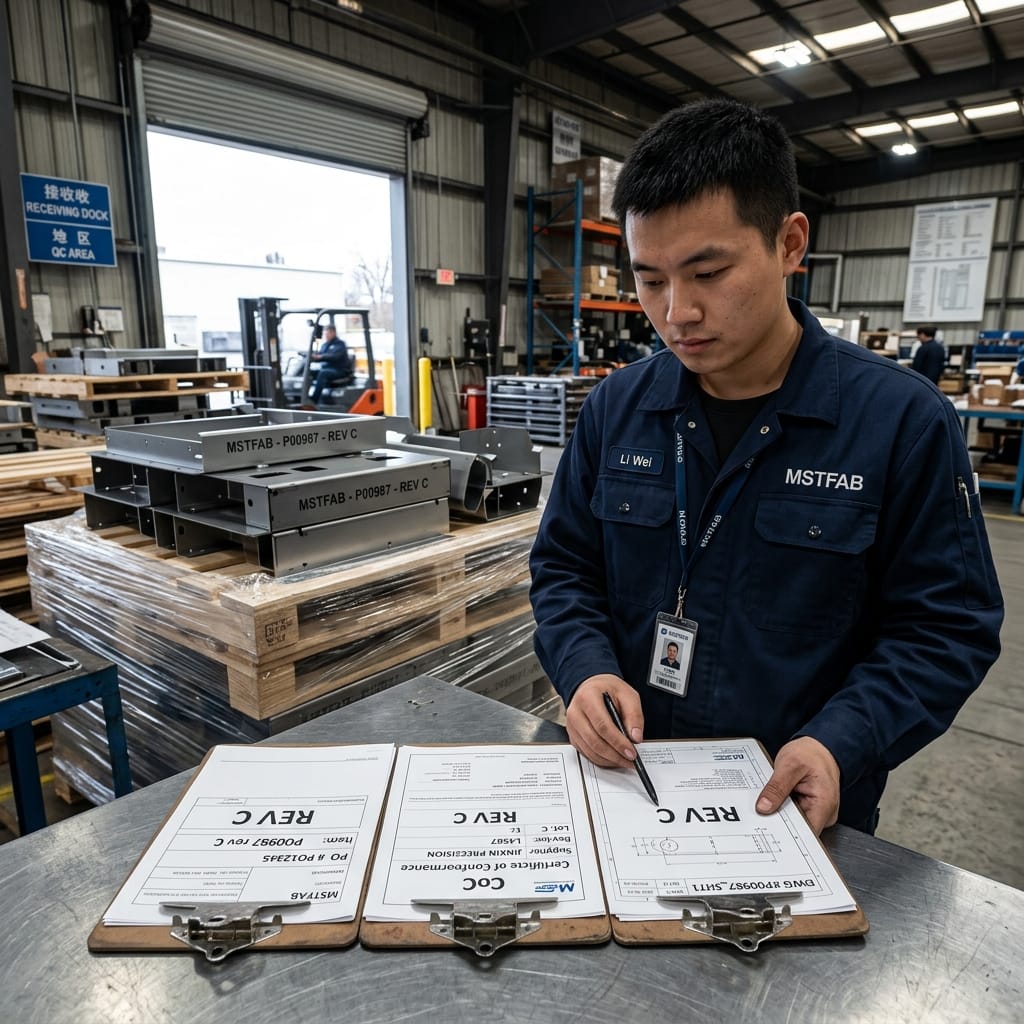
Shop Floor Revision Purges & Bin Segregation
When an engineering change takes effect, the supplier must complete a physical floor sweep:
- WIP Purging: Clear all sheet metal blanks, formed subassemblies, and weldments tied to the prior revision from the production floor.
- Color-Coded Tote Bins: Place new revision parts into distinct, labeled totes (e.g., green containers for REV C) while obsolete parts are moved to red quarantine bins awaiting formal disposition.
- Unannounced Revision Audits: Quality assurance leads perform weekly unannounced audits at CNC punch presses and press brakes, verifying that open CAM files and paper drawings correspond to active ERP travelers.



Eliminate Drawing Revision Errors in Sheet Metal Fabrication
MSTFAB’s digital manufacturing platform synchronizes CAD releases, CAM nesting, and press brake programs directly from your engineering models. We enforce 100% digital revision tracking, laser part serialization, and three-way dock matching to guarantee zero obsolete parts reach your assembly line. Request a consultation with our quality engineering team today.
 WeChat Contact
 WhatsApp Me Directly